Module · Time tracking
Time tracking for accounting firms.
Time tracking that connects to the plan. Log hours in a familiar month calendar, linked in seconds to client, project, and activity — with week and month totals in one overview.
No payment details required · cancel any month
Time tracking / July 2026
143:30 h this month
MONTUEWEDTHUFRI
2840:15
68:00
Van Dijk Beheer2:15
Korenwaard5:45
77:00
Westerrijck Proj.1:30
Kanaalstede Log.5:30
89:15
Lindehof Vastgoed4:45
Amstelpoort4:30
98:00
De Haan Logistiek8:00
108:00
Peeters & Partners8:00
2940:00
138:00
Van Dijk Installaties8:00
148:00
Stichting Wijkhuis3:30
Bakkerij Vermeulen4:30
158:00
Duinbrug Beheer6:30
Noorderpoort IT1:30
168:00
Fysio Middenland8:00
178:00
Rivierwijk Techniek5:15
Maasbrug Consult2:45
3023:15
208:00
Van Dijk Vastgoed8:00
218:45
Brinkhof Groep4:00
Van Loon Advies4:45
226:30
Meerdijk Techniek2:30
Veenstra Bouw4:00
23
24
Booking hours without the hassle.
Open the day, pick a client through autocomplete, fill in the hours — every entry lands straight on the right client, project, and activity.
- Month calendar with day and week totals.
- Linked to client, project, and activity.
- Or start the timer and log the entry afterwards.
- Instantly clear which hours are still open.
Log hours / Wednesday 15 July
8:00 hours
Client
Search for a client…
Amount
0:00
Project
—
Activity
—
Description
What was worked on?
Logged on this day2
Duinbrug Beheer B.V.Annual accounts · at 09:12Draft annual accounts prepared and reconciled
6:30Noorderpoort IT B.V.Financial bookkeeping · at 15:42Bank transactions and purchase invoices processed
1:30Leave & absence
Hours, leave, and contract per employee.
Straight from time tracking: hours logged, leave balance, sick leave, and overtime per person — with the contract right alongside.
- Hours logged, leave, sick leave, and overtime in one chart.
- Leave balance and overtime tracked automatically.
- Contracts with hours per week and per day.
Time tracking / Thijs van den Berg
1,102.75 h
JanFebMarAprMayJunJul
HOURS TOTAL1,102.75
SICK HOURS32.00
LEAVE BALANCE24.50
OVERTIME−33.25
Budgets that stay under control.
See usage per client, project, and fiscal year — overruns show in red, so adjusting course happens in time.
- Hour and rate budget versus actual.
- Per client, project, and fiscal year.
- Overruns visible immediately.
Budgets
812 clients
CLIENT
HOURS
BUDGET
USED
10020Oosterrijck Media2025
51:45€5,250108%
10052Korenwaard
38:00€3,900101%
10010Noorderpoort IT2026
64:30€6,40091%
10027Peeters & Partners2025
82:15€8,20074%
10014De Haan Logistiek
41:15€4,75066%
10047Maasbrug Consult
46:00€3,90062%
10044Scheldeland Retail2026
76:30€7,00058%
Always a clear view of what is left to invoice.
One filterable report on every logged hour, with rate, price, and status per line. Filter on what has not been invoiced yet and the totals — lines, hours, and euros — move with it.
- Rate, price, and status per line.
- Filter per column, with totals that follow.
- Export to Excel or CSV.
Hours report / July 2026
Actions
Status: To invoice
164 rows418:30 hours€35,991.50
CLIENT
ACTIVITY
AMOUNT
PRICE
STATUS
14 JulNoorderpoort IT
Financial bookkeeping3.00 h€255To invoice14 JulMaasbrug Consult
Quality review of the file1.50 h—Non-billable15 JulBakkerij Vermeulen
Annual accounts2.50 h€238Invoiced16 JulScheldeland Retail
VAT return1.25 h€106To invoice17 JulNoorderpoort IT
Annual accounts4.00 h€380To invoice18 JulVan Dijk Beheer
Payroll tax return2.00 h€150Invoiced21 JulRivierwijk Techniek
Financial bookkeeping1.75 h€149To invoice21 JulOosterrijck Media
Internal meeting1.00 h—Non-billableThese hours come out of the planning: what is scheduled per client sits beside what was actually written.
See the planning ›AI connection via MCP
Just ask time tracking — through Claude, ChatGPT, Copilot, or another AI assistant.
More about the AI connection →AI assistant
MCP
How many hours did the team log last month?
126:30 hours in Jun, of which 112:00 billable — most of it on Financial bookkeeping.
Which clients are over their budget?
Two: Oosterrijck Media (108%) and Korenwaard (101%).
Ask a question about the hours…
Book hours from the phone.
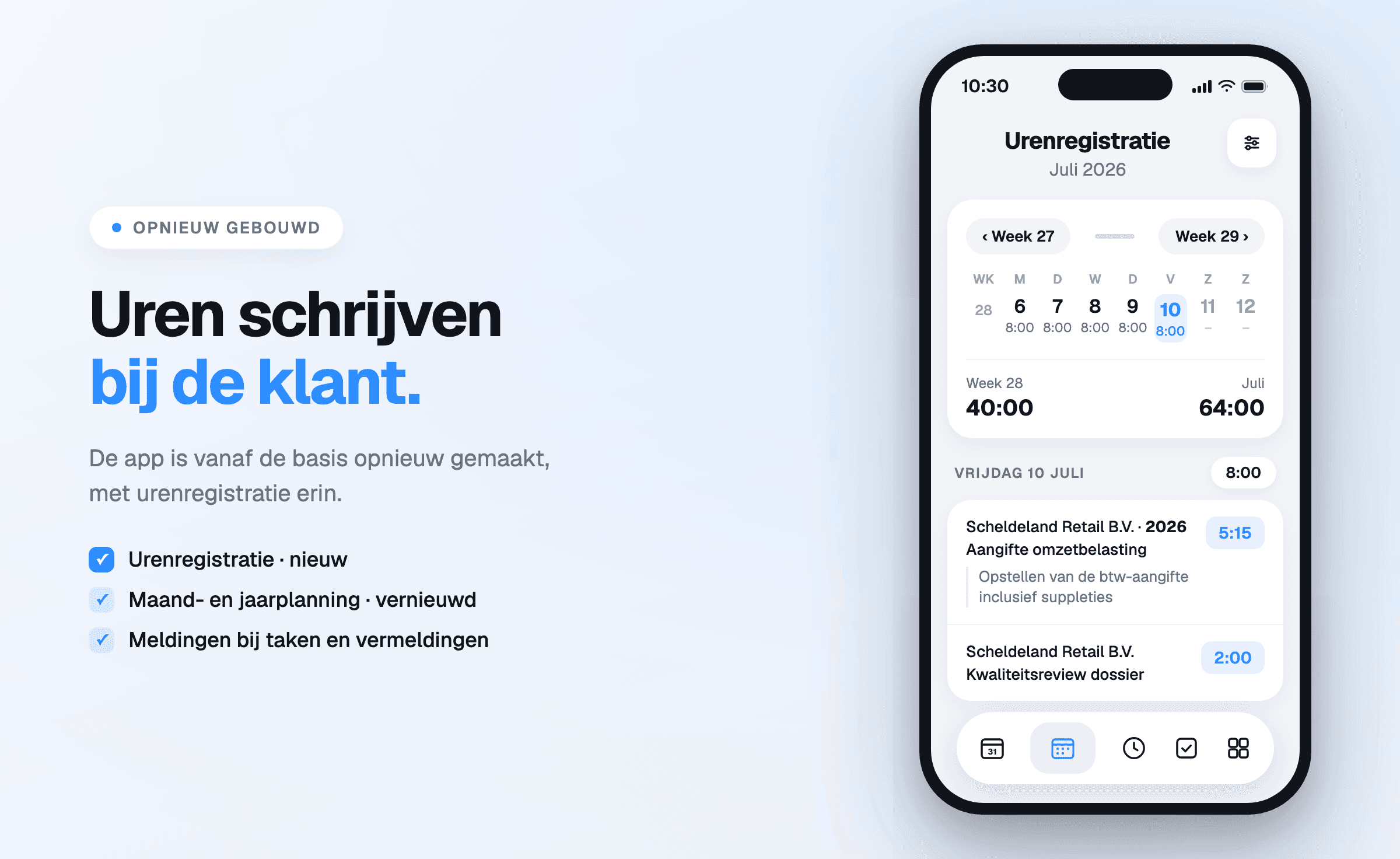
Heading back from a client visit? The hours are booked before the car leaves the parking lot — in the Offsoo app for iOS and Android.
- Week overview with day and month totals.
- Book to client, project, and activity.
9:41
Edit entry
‹ Week 27Week 29 ›
M68:00T78:00W88:00T98:00F108:00S11–S12–
Week 28 · 40:00July · 64:00
9
Noorderpoort IT B.V.Annual accounts
4:30De Haan Logistiek B.V.Financial bookkeeping
3:3010
Scheldeland Retail B.V.VAT return
5:15Scheldeland Retail B.V.Quality review of the file
2:0016No hours on this day.
Questions about time tracking
Hours are logged against the same client, project and activity as in the planning. The client file keeps that client's planning and logged hours together, and the hours budget per client and project shows how much has been used.
Yes. A timer runs while the work is done, and the time is logged afterwards against a client, project and activity. Those who prefer to fill in per day log hours straight into the month calendar, with day, week and month totals.
The reports on hours, expenses and mileage filter per column and per period, with rate, price, billable and status on each line. Every report exports to Excel or CSV for further processing, and the monthly and annual planning can be exported too.
Yes. Per employee, hours logged, leave, sickness and overtime sit in one annual chart, with the leave balance and overtime below it. The balances follow from the time tracking and the employee's contract, with hours per week and per day.
Yes. The Offsoo app for iOS and Android logs hours against a client, project and activity, with a description, and keeps the hours overview at hand. The same app shows the monthly and annual planning, tasks and client details.

Hours that add up, every month.
Start today with a pre-filled trial environment, or plan a demo to see time tracking in action.