At most firms, time tracking is not disliked because filling it in takes so long, but because it
happens at the wrong moment. Friday afternoon, calendar open, thinking back to Tuesday. What gets
entered then is a reconstruction, and a reconstruction almost always comes out lower than reality.
That gap is not an administrative detail. It is money directly: hours not recorded are not
invoiced, and work that structurally takes more time than assumed stays invisible as a result.
Why filling in afterwards always yields too little
Three things get lost between Tuesday and Friday.
The short actions. A twenty-minute phone call, a question answered in passing, a half-hour
review. They rarely make the week sheet, while together they form a considerable part of the week.
The correct allocation. What gets booked on Friday as "miscellaneous work" belonged to a client
and to an activity. Without that allocation, nothing can be read per client.
The billable distinction. Consultation, training and internal work disappear into a residual
line. That line is exactly what is needed to know how many hours per employee are genuinely
available for client work.
How an hour is recorded in Offsoo
An hours line always hangs off a client and an activity — both required. A project and
a description are optional. The activity is the firm's own vocabulary: file quality review,
bookkeeping review, payroll administration, VAT return, tax advice, client consultation. Leave runs
along as an activity of its own.
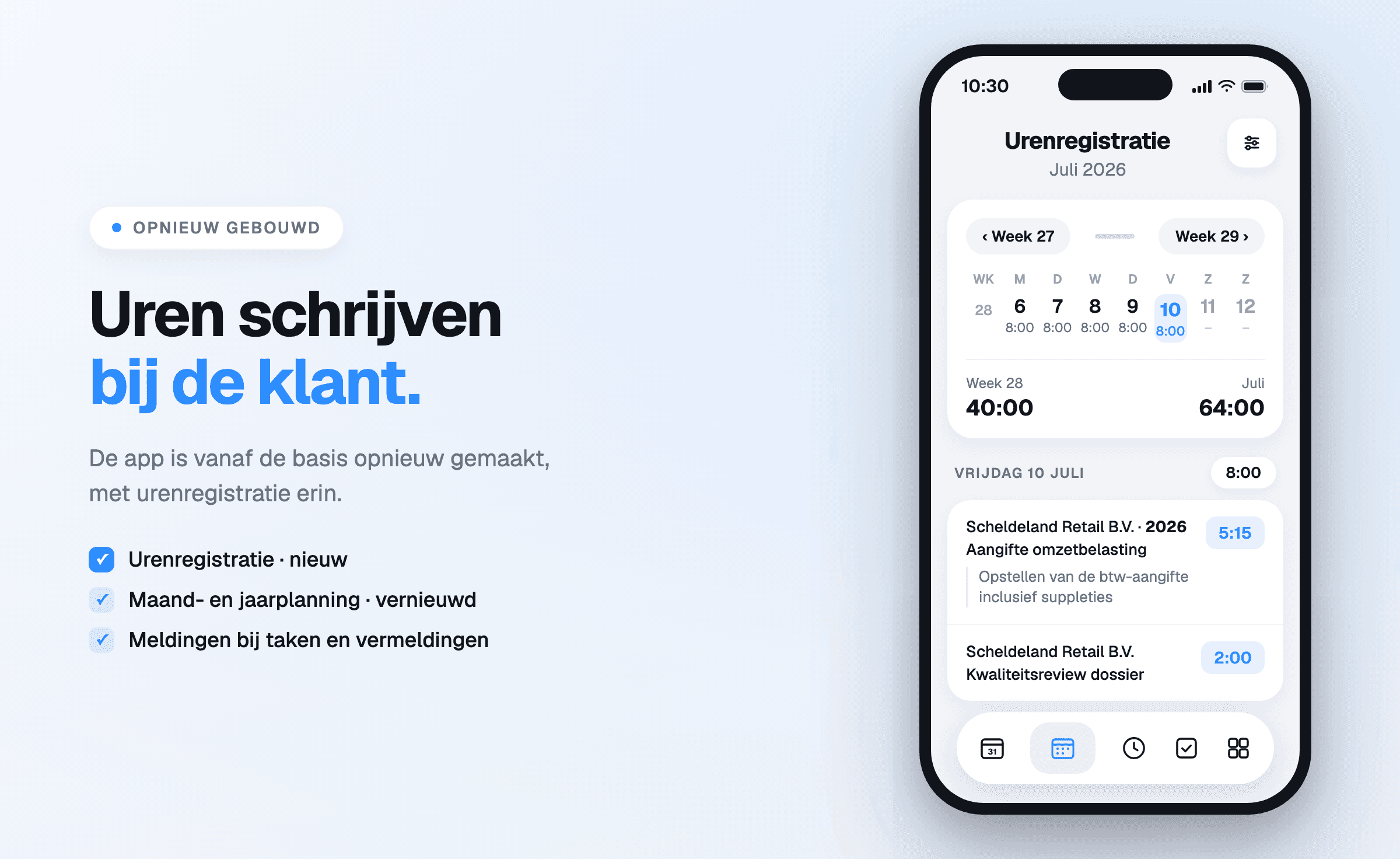
Entry works with a time or with the stopwatch, and alongside hours the same screens hold
expenses and mileage — the costs and kilometres that otherwise end up on a loose note.
The month overview shows what was recorded per day, a weekly total per week and the monthly total
at the top. A day that lags behind therefore stands out before the month is over.
Next to the planning
Recorded hours only become truly informative alongside the planned hours of the same activity.
Every activity in the planning carries what the
work should cost; time tracking shows what it actually cost. That difference can be read per client
and across a longer period.
While planning a year, Offsoo carries that through to the employee: what is contracted, what is
planned and how much leave comes off. The difference is the room that is left.
What comes out of the report
The hours report can be filtered by client, contact, project, user, activity, date and tag, and
shows per line the rate, the price and the status billable, non-billable or invoiced.
The totals sit at the top: number of lines, number of hours and the amount over the chosen period.
There is also a budgets tab: what was agreed per client or project, and how much of it has been
used while the work is still running.
Offsoo does not send invoices itself. It keeps the hours complete, tracks their status, exports the
overview, and makes the hours available through the API or the MCP connection to the package that
does the invoicing.
What can be read from it afterwards
- Per client — what a client genuinely costs in time against what has been invoiced. That is
the pricing conversation, held with figures.
- Per activity — which type of work structurally takes more time than it is given. A VAT round
that overruns by a third each time is a planning error repeating itself every period.
- Per employee — the ratio between billable and non-billable work, and the gap between contract
hours and recorded hours.
- Per budget — how much of an agreed budget is left, during the work rather than after it.
Introducing it without resistance
Time tracking rarely fails on the technology and often on the introduction. Three things help.
Start with one agreement about the moment: daily, at the end of the day. Filling in weekly is
precisely the habit that causes the problem.
Be clear about what it is used for. Hours that only go to invoicing feel like supervision.
Hours that also adjust next quarter's planning give something back to the person entering them.
Review the first month together. The activities that consistently overrun are almost always
recognisable to the whole team — and that is the moment tracking shifts from obligation to
instrument.
Start a free 14-day trial, or see what
time tracking does exactly.